
Data Models, Schemas, and Instances
One key characteristic of the database approach is that it provides data abstraction — hiding physical storage details and giving users a conceptual view of the data. The main tool for this is the data model.
Data Models
Definition
Data model: a collection of concepts used to describe the structure of a database — its data types, relationships, and constraints — together with a set of basic operations for retrieving and updating the data.
Structure alone is not enough, so a data model usually also includes:
| Part | Meaning |
|---|---|
| Basic operations | A standard set of operations the model provides (e.g. insert, delete, modify, retrieve) |
| Dynamic aspect / behavior | User-defined operations allowed on the data (e.g. computeGpa()) — common in object data models |
Data models are grouped by how close they are to the way users see data vs the way the computer stores it:
| Category | Also called | Who uses it | Concepts |
|---|---|---|---|
| High-level / conceptual | Conceptual data model | End users | entity (a real-world object/concept), attribute (a property of an entity), relationship (an association among entities) — e.g. the ER model |
| Representational / implementation | Between the two | Understood by end users but close to storage | The relational model (tables), plus legacy network/hierarchical models |
| Low-level / physical | Physical data model | System specialists (DBA, implementers) | How data is stored: record formats, orderings, access paths (indexes) |
| Self-describing | — | NoSQL / big data | Combine data description with the data values themselves — e.g. XML, key-value stores, JSON documents |
Example: an entity
STUDENThas attributesName,Student_number; aSECTIONentity relates to aCOURSEentity through the relationship "is a section of". A conceptual (ER) model expresses this without saying anything about files or disk blocks.
Schemas, Instances, and Database State
There is a crucial difference between the description of a database and the actual data in it at a moment in time.
Definition
Database schema: the description of the database — the structure, data types, and constraints. Specified during design and not expected to change often.
Definition
Database state (or snapshot / instance): the actual data in the database at a particular moment. Changes every time the database is updated.
| Aspect | Schema | State |
|---|---|---|
| What it is | The structure / description | The data itself right now |
| Also called | Intension | Extension / snapshot |
| How often it changes | Rarely (design-time) | Constantly (every insert/update/delete) |
| Displayed as | A schema diagram (shows constructs, not values) | The set of current rows |
- A schema construct is one object within the schema (e.g. the
STUDENTtable, or theNameattribute). - When we define a new database, we specify only its schema to the DBMS — the state is the empty state (no data). After the first data is loaded, it moves to the initial state. Every update produces a new current state.
- The DBMS is responsible for ensuring every state is a valid state — one that satisfies the structure and constraints in the schema.
Schema vs State
The DBMS stores the schema in its catalog (metadata). The schema is like a type/class in programming; the state is like the set of current objects/values of that type. Changing the schema itself is called schema evolution.
Example: the schema says
STUDENT(Name, Student_number, Class, Major). On Monday the state has 3 students; after enrolling 2 more on Tuesday the state has 5 students — but the schemaSTUDENT(...)did not change.
Three-Schema Architecture and Data Independence
The three-schema architecture (also called the ANSI/SPARC architecture) is a framework whose goal is to separate the user's view from the physical storage, in order to achieve data independence.
Definition
Three-schema architecture: defines schemas at three levels so that the physical layout can change without forcing users' programs to change.
| Level | Schema | Describes | Data model used |
|---|---|---|---|
| Internal level | Internal schema | The physical storage structure — record formats, access paths, indexes | Physical / low-level data model |
| Conceptual level | Conceptual schema | The whole database's structure for a community of users: entities, types, relationships, constraints — hides physical details | Representational (e.g. relational) or conceptual model |
| External level | External schemas (user views) | The part of the database a particular user group sees; hides the rest | Same high-level model as the conceptual schema |
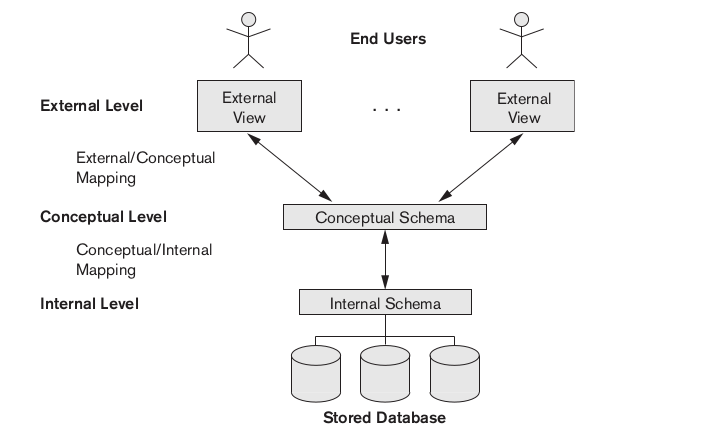
The three levels only describe data; the actual data lives at the internal (physical) level. So the DBMS must map a request between levels:
- External ↔ conceptual mapping: transforms a request on a user view into a request on the conceptual schema.
- Conceptual ↔ internal mapping: transforms a conceptual request into commands over the physical storage.
Example: an instructor's external view shows only
(Student_name, Grade)for their own course. The DBMS maps this view onto the conceptualSTUDENTandGRADE_REPORTtables, then maps those onto the internal stored files and indexes to actually fetch bytes from disk.
How the 3 schema levels relate to the 3 data-model types
The two "ladders" run parallel by level of abstraction, but they are not a strict 1-to-1 match:
| Schema level | Data model used to describe it |
|---|---|
| Internal | Physical / low-level — clean 1-to-1 match |
| Conceptual | Representational (e.g. relational) — first designed with a high-level/conceptual model (ER), then translated to relational for implementation |
| External | Same high-level/representational model as the conceptual level, just restricted in scope (a view over the conceptual schema) |
Watch the name clash: "conceptual data model" (= the ER model, one of the three model types) is not the same as the "conceptual schema level" (= the middle tier). At the conceptual level you pass through both: ER model to think it up → relational model to build it.
Data Independence
Definition
Data independence: the ability to change the schema at one level without having to change the schema at the next higher level (and therefore without changing the application programs).
There are two kinds, matched to the two mappings:
| Type | Definition | What can change | Example |
|---|---|---|---|
| Logical data independence | Change the conceptual schema without changing the external schemas or programs | Add/remove a table or column, add a constraint | Adding a Date_of_birth column to STUDENT doesn't break a view that only uses Name |
| Physical data independence | Change the internal schema without changing the conceptual schema | Reorganize files, add/remove an index, change storage format | Adding an index to speed up queries doesn't change the conceptual STUDENT table or any program |
Why it works
When a lower-level schema changes, only the mapping between the two levels has to be updated by the DBMS — the higher-level schema and the application programs stay the same. Physical data independence is easier to achieve and more common than logical data independence.
Database Languages
DBMS Languages
Once the design is done, the schema and data are defined and manipulated through DBMS languages:
| Language | Full name | Purpose |
|---|---|---|
| DDL | Data Definition Language | Define the conceptual (and internal) schema — e.g. CREATE TABLE, ALTER TABLE |
| SDL | Storage Definition Language | Specify the internal schema (physical storage). In many modern DBMSs this is merged into the DDL or hidden. |
| VDL | View Definition Language | Define external schemas / user views — e.g. CREATE VIEW |
| DML | Data Manipulation Language | Retrieve, insert, delete, and modify data — e.g. SELECT, INSERT, UPDATE, DELETE |
In practice
In a relational DBMS like SQL, one integrated language (SQL) covers DDL, VDL, and DML — there aren't separate languages for each.
DMLs come in two flavors:
| Kind | Also called | Style | Example |
|---|---|---|---|
| High-level / declarative | Set-at-a-time (set-oriented) | Say what you want, not how to get it — processes a set of records per statement | SELECT Name FROM STUDENT WHERE Major = 'CS' |
| Low-level / procedural | Record-at-a-time | Say how to retrieve, one record at a time, usually with loops | Fetching rows one by one inside a program loop with a cursor |
- A high-level DML used on its own (interactively) is called a query language.
- When DML statements are embedded in a general-purpose programming language, that language is the host language and the DML is the data sublanguage.
The Database System Environment
DBMS Component Modules
A DBMS is a complex piece of software. Its main modules and how they cooperate:
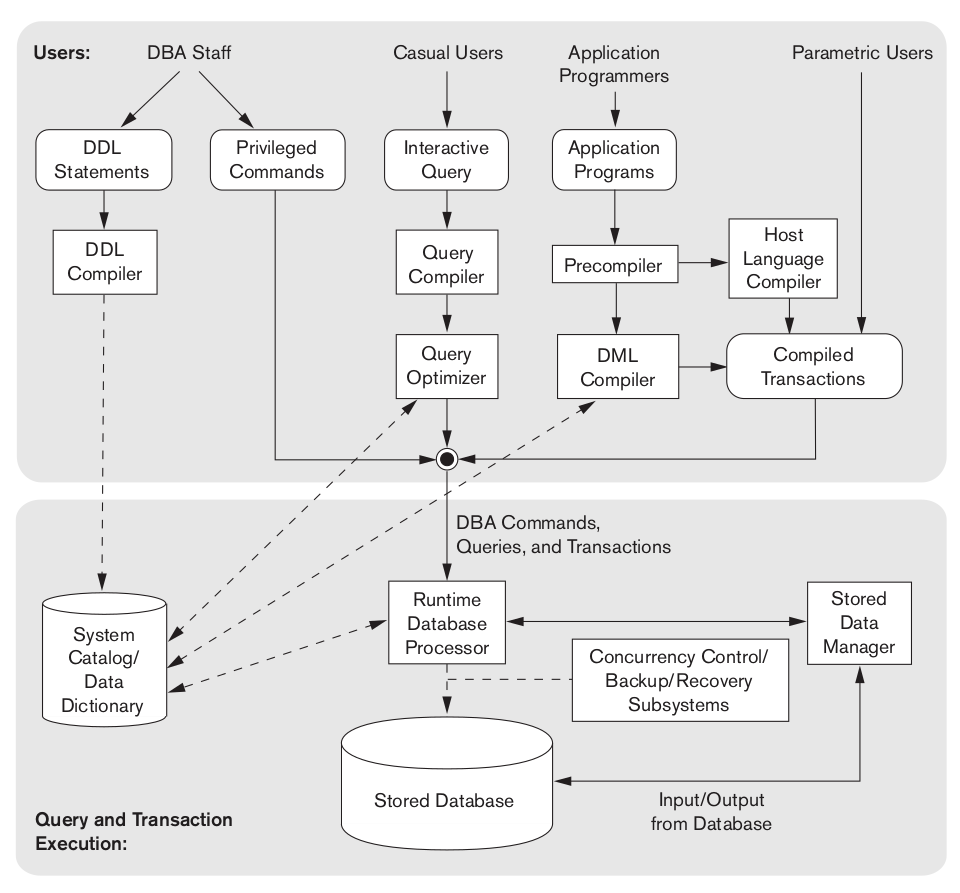
| Module | Job |
|---|---|
| DDL compiler | Processes schema definitions and stores the description (metadata) in the catalog |
| Query compiler & optimizer | Parses a high-level query, checks it against the catalog, and picks an efficient execution plan |
| Precompiler | Extracts DML commands embedded in a host-language program and sends them to the DML compiler |
| Runtime database processor | Executes the compiled/optimized commands against the stored database |
| Stored data manager | Controls access to the DBMS information stored on disk (whether it is data or catalog) |
| Buffer management | Moves pages between disk and main memory, deciding what to keep in memory |
Flow of a query: a user's SQL → query compiler/optimizer (check catalog, plan) → runtime processor → stored data manager / buffer manager → disk → results back to the user.
Database System Utilities
Database utilities: tools the DBA uses to manage the system:
| Utility | Function |
|---|---|
| Loading | Load existing files (e.g. text/CSV) into the database, converting formats |
| Backup | Make a backup copy (full or incremental) for recovery |
| Database storage reorganization | Reorganize files/indexes to improve performance |
| Performance monitoring | Gather usage statistics so the DBA can tune the system |
Tools, Application Environments, and Communications
- CASE tools: used in the design phase of the database.
- Data dictionary / information repository: stores catalog info plus design decisions, usage standards, and descriptions — queried by users, not just the DBMS.
- Application development environments (e.g. frameworks/ORMs): help build database applications.
- Communications software: lets remote users access the database over a network (DB/DC — database/data-communications systems).
Centralized and Client/Server Architectures
Centralized DBMS Architecture
All components — data, DBMS software, and processing — run on one central machine; users connect through simple terminals that only display results. All the real work happens centrally.
Basic Client/Server Architecture
A client/server architecture splits the system into two kinds of machines connected by a network:
| Component | Role |
|---|---|
| Server | A machine that provides services: file server, print server, or DBMS (database) server |
| Client | A user machine that requests services, with a friendly interface and local processing power |
Two-Tier Client/Server Architecture
The application logic sits on the client; the DBMS sits on the server.
- The client runs the user interface and the application programs, and connects to the DBMS server (e.g. via ODBC/JDBC APIs).
- The server runs the DBMS and does query processing and transaction management.
- Tier = client, Tier = database server.
Three-Tier Client/Server Architecture
The three-tier architecture is common for web applications: an application/web server is inserted in the middle.
| Tier | Contains | Responsibility |
|---|---|---|
| Presentation (client) | Browser / GUI | Display and collect user input |
| Application (middle) | Web/application server | Business logic, and it mediates between client and database |
| Database | DBMS | Store data and process queries |
Why the middle tier helps
It improves security (the client never talks to the database directly) and scalability (business rules live in one place). Sometimes the middle tier is split further, giving an n-tier architecture.
Classification of DBMSs
DBMSs can be categorized along several axes:
| Criterion | Categories |
|---|---|
| Data model | Relational, object, object-relational, key-value / document / graph (NoSQL), plus legacy hierarchical and network |
| Number of users | Single-user (one user at a time — e.g. a personal desktop DB) vs multiuser (many concurrent users — most systems) |
| Number of sites | Centralized (data on one site) vs distributed (DDBMS) (data spread over many sites) |
| Distribution homogeneity | Homogeneous (same DBMS software at all sites) vs heterogeneous / federated (different DBMSs cooperating) |
| Cost | Free/open-source, low-cost, to large enterprise systems |
| Types of access path | E.g. systems using inverted-file structures for records |
| Purpose | General-purpose vs special-purpose (e.g. an OLTP system tuned for high-volume transactions) |
Distributed vs centralized
A DDBMS stores the database across multiple physically separate sites connected by a network, but ideally makes it look like one database to the user (distribution transparency). A homogeneous DDBMS uses the same DBMS everywhere; a federated / heterogeneous system connects pre-existing, different databases.
Example: SQLite embedded in a phone app is essentially single-user, centralized, general-purpose, relational. A large bank's system spread across data centers, tuned for transactions, is multiuser, distributed, OLTP, relational.