
What is a Database?
Definition
Database: a collection of related data, with 3 properties:
- It represents some part of the real world — called the miniworld or Universe of Discourse (UoD)
- It is a logically coherent set with inherent meaning — not random data
- It is designed, built, and loaded with data for a specific purpose
Example: the contacts list on your phone is a small database — its miniworld is "people you know", the data has meaning (a name tied to a phone number), and it has a clear purpose (to call/text). A sheet of paper with random numbers is not a database, because it has no meaning and no purpose.
A database can be any size — from a small personal spreadsheet to a system with millions of records at a large company.
DBMS (Database Management System)
Definition
DBMS: a set of programs that lets users create and maintain a database.
A DBMS is general-purpose software — the same DBMS (e.g. PostgreSQL, MySQL) can manage many different databases (a school database, a sales database, ...), because it provides 4 core functions:
| Function | Meaning | Example |
|---|---|---|
| Definition | Specify data types, structure, and constraints — stored as metadata/catalog | CREATE TABLE Student (id INT PRIMARY KEY, name VARCHAR(50)) |
| Construction | Store the actual data on some storage device | INSERT INTO Student VALUES (1, 'An') |
| Manipulation | Query, update, and produce reports | SELECT * FROM Student WHERE id = 1 |
| Sharing | Let many users/programs access the data at the same time | Two staff members look up the same student at the same time |
Key distinction
Database system = Database + DBMS software. Just these two — application programs are not part of it.
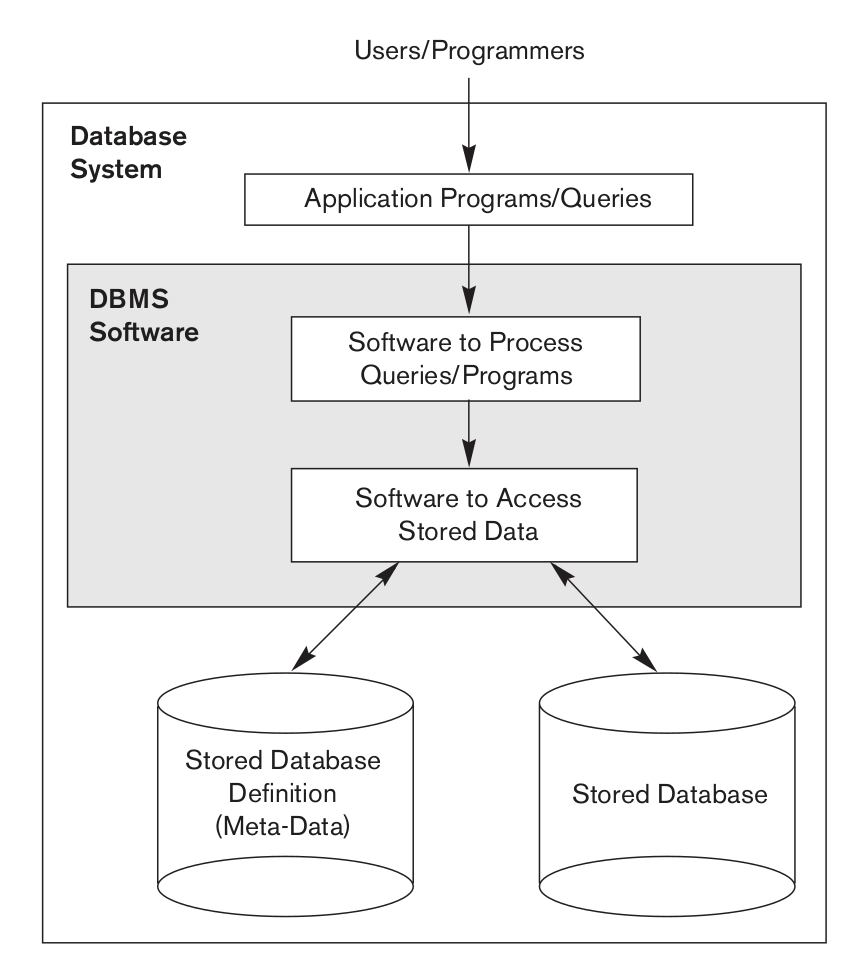
Based on the picture above, split it into 3 separate layers that are easy to mix up:
| Layer | What it is | Who builds it |
|---|---|---|
| Application Programs/Queries | A specific program or query for one task (e.g. an app that looks up a student's grades) | Written by a programmer/end user |
| DBMS Software | The general-purpose engine that processes queries and accesses storage (the "process queries" block and the "access stored data" block) | Written by a DBMS vendor (PostgreSQL, MySQL, ...) |
| Database | The actual data (Stored Database) plus the catalog that describes it (Stored Database Definition/Meta-Data) | Stored by the DBMS, following the schema a designer defines |
- Database system only covers the bottom two layers: DBMS software + database.
- Application programs sit outside/on top of the database system — written by a user/programmer to talk to the DBMS software, like a client calling a service. It uses the database system; it is not part of the database system.
Example: PostgreSQL (DBMS software) is running and manages the
university_dbdatabase (Database) — together these two form the "database system". A Node.js web app that sends SQL to PostgreSQL to look up grades is an application program — it sits outside, and is not counted as part of the "database system".
Example — UNIVERSITY database
- Mini-world: students, courses, and grades at a university
- Data groups to store:
STUDENT: Name, Student_number, Class, MajorCOURSE: Course_name, Course_number, Credit_hoursSECTION: Section_identifier, Semester, Year, InstructorGRADE_REPORT,PREREQUISITE, ...
Characteristics of the Database Approach
Compared to the traditional way of storing data with file processing (each application defines and manages its own files — e.g. a payroll program has its own file, a student records program has its own file, even though both store employee/student names), the database approach stands out in 4 ways:
1. Self-describing nature
A database holds not just data, but also its own meta-data (the database catalog) describing its structure and constraints (table names, column names, types, keys...).
Example: when you run
\d studentinpsql, the DBMS looks up its own internal catalog to print the table structure — it does not read the code of some specific application. This is why a single DBMS (e.g. PostgreSQL) can stay generic and manage any number of different databases: each database's structure already "declares itself" to the DBMS.
2. Insulation between programs and data, and data abstraction
This characteristic bundles a few smaller ideas that are easy to confuse. Here they are, kept separate:
| Term | Meaning |
|---|---|
| Data Abstraction | The general goal: hide the physical storage details, and show the user/program only a conceptual representation of the data. It's the "goal" — achieved through the two kinds of independence below. |
| Program-Data Independence | An application program does not need to know the physical storage structure or access method of the data, because the DBMS keeps that information in the database catalog (the metadata store), separate from the program's code. Changing the storage structure only means updating the catalog — no need to change the program. |
| Program-Operation Independence | (Clearest in object-oriented/object-relational systems) An operation on the data is defined through a fixed name/interface, while its internal implementation can change without affecting the programs that call it — similar to encapsulation in OOP. |
| Data Model | The tool/set of concepts used to actually deliver data abstraction — it describes data structure (types, relationships, constraints) at a conceptual level, usually with a basic set of operations. Example: the relational data model represents data as tables (relations); users work with the concepts of "table – row – column" without knowing which file or disk block the data physically sits in. |
Program-data independence example: if the DBA changes how the
STUDENTtable is stored — adds an index for speed, or changes the underlying file format — old application programs (e.g. a web app that looks up grades) still work with no code changes, as long as the interface they use (e.g.SELECT Name, Major FROM STUDENT) stays the same.
Program-operation independence example: a method
computeAverageGrade()is defined in the data model. A program only calls this method by name. If the internal calculation is changed later (e.g. optimized), the calling program needs no changes, because it only cares about the method name and the result, not how it's computed inside.
3. Support of multiple views of data
Different users can see the data through different user views that fit their own needs, even though the underlying data is just one copy.
Example: from the same
STUDENT+GRADE_REPORTtables, the registrar's office sees full grade and personal data, while an instructor only sees a limited view (only students in their own class, only the grade column for their own course).
4. Sharing of data & multiuser transaction processing
Many users/programs access the same data at the same time — this needs concurrency control to keep the data from becoming inconsistent.
Transaction
Transaction: a unit of program execution that accesses/updates a database, treated as one indivisible unit (atomic). The DBMS must keep results correct even when many transactions run at the same time.
Classic example — lost update: a bank account holds $100. Two transactions both read the balance as $100 at the same time:
- Transaction A: withdraws $50 → computes 100 - 50 = 50, writes it back
- Transaction B: withdraws $30 → also computes from the original $100 → 100 - 30 = 70, writes it back (overwriting A's result)
Final result: balance = $70, even though it should be 100 - 50 - 30 = $20. This is the lost update problem — A's update is "lost" because B overwrote it. A DBMS uses concurrency control (e.g. locking) to prevent this.
Actors on the Scene
People who interact directly with designing/using the database:
| Role | Job |
|---|---|
| Database Administrators (DBA) | Manage database resources, grant access, monitor performance, handle backup/recovery |
| Database Designers | Decide what data to store and pick a structure to represent/store it (usually work before the database is actually built) |
| End Users | The people who query/update the database through an application or a query language — 4 types below |
| System Analysts & Application Programmers (Software Engineers) | Analyze end-user requirements, then design and build programs (transactions) that meet them |
The 4 types of End Users
| Type | Trait | Example |
|---|---|---|
| Casual end users | Access the database occasionally, need different information each time — use a query language | A manager occasionally runs a one-off SQL query for an ad-hoc report |
| Naive / Parametric end users | The majority — only run pre-written, canned transactions, never write a query | A bank teller clicks a "check balance" button in existing software |
| Sophisticated end users | Fully understand DBMS capabilities, write complex applications/queries themselves | A data analyst writing complex SQL analysis |
| Standalone users | Maintain a personal database using ready-made software | Someone using personal finance software |
Workers Behind the Scene
People who don't interact directly with a specific database, but are involved in designing, building, and running the DBMS software itself and the surrounding system environment:
- DBMS system designers and implementers: design/build the DBMS's modules and interfaces (e.g. the team building PostgreSQL)
- Tool developers: design/build supporting tools — design tools, performance monitoring tools, ...
- Operators and maintenance personnel: run and maintain the hardware/software of the database system
Advantages of Using the DBMS Approach
| Advantage | Explanation | Example |
|---|---|---|
| Controlling redundancy | Less duplicate data than storing separate files per application | No need to store "employee name" in both a payroll file and an HR file — one place only, avoiding inconsistency when one gets updated and the other doesn't |
| Restricting unauthorized access | Fine-grained authorization by user/role | An instructor can't see another employee's salary |
| Providing persistent storage for program objects | The database can store complex objects that outlive the program that created them | An object-oriented DBMS stores a persistent object directly, with no need to convert it back and forth |
| Providing storage structures & search techniques | Efficient storage layouts and search algorithms | Indexing makes SELECT ... WHERE id = 17 faster than scanning the whole table |
| Providing multiple interfaces | Different interfaces for different kinds of users | A query language for casual users, an API for application programmers, a GUI for parametric users |
| Representing complex relationships among data | Data of different kinds can be linked together | One student — many courses — many grades, linked through foreign keys |
| Enforcing integrity constraints | The DBMS automatically checks that data stays valid | Rejects a grade above 10, or two students with the same student number |
| Providing backup and recovery | Restores data after a hardware/system failure | Power loss mid-transaction → the DBMS rolls back to the last valid state |
When NOT to Use a DBMS
A DBMS isn't always the right choice — its overhead (performance cost, complexity, licensing/staffing cost) may not be worth it when:
- The application is simple, with a fixed data structure that isn't expected to change
- Multiple concurrent users/programs don't need to access the data
- Real-time constraints are too tight for the DBMS's overhead (constraint checking, logging, concurrency control, ...) to keep up
- Fixed, hand-coded programs already meet the need — the flexibility a DBMS offers isn't needed, and adding one would just make the system heavier than necessary
Example: a small embedded control system in an IoT device that only logs a few fixed sensor values in a fixed format, running in real time — using a full DBMS here is overkill; a few lines of code writing straight to a file are enough.