
Introduction
Databases are stored physically as files of records on secondary storage (mostly magnetic disks and SSDs). This chapter looks at the level below the conceptual and logical models — how the DBMS actually organizes bits on a device and moves them into memory to answer queries.
Why not just keep everything in main memory?
Main memory (RAM) is fast but has three problems for a database:
- Too small / too expensive to hold databases that reach hundreds of GB or TB.
- Volatile — its contents are lost on power failure or crash, so it cannot be the permanent home of data that must survive.
- Secondary storage (disk / flash) is nonvolatile and much cheaper per byte, so it holds the persistent copy.
The database is kept permanently on secondary storage; portions are copied into main-memory buffers when needed for processing, and modified portions are written back to disk. Understanding storage matters because disk access is the dominant cost of query execution, and the physical design (file organization, indexes) directly determines performance.
The Memory Hierarchy and Storage Devices
Computer storage forms a hierarchy: as you go down, capacity and cost-effectiveness rise, but speed falls.
| Level | Devices | Volatile? | Typical role |
|---|---|---|---|
| Primary storage | CPU cache (static RAM), main memory (dynamic RAM) | Volatile | Data the CPU operates on directly; fast, limited size |
| Secondary storage | Flash / SSD, magnetic hard disk (HDD) | Nonvolatile | The online persistent home of the database |
| Tertiary storage | Optical disks (CD/DVD/Blu-ray), magnetic tape | Nonvolatile | Offline archival & backup; cheap, huge, slow |
Definition
Volatile storage loses its contents when power is cut (e.g. RAM). Nonvolatile storage retains its contents without power (e.g. disk, flash, tape).
- Cache is the fastest and smallest; the CPU also has registers. Main memory (the primary storage the DBMS runs in) is next.
- Flash memory / SSDs sit between RAM and magnetic disk: nonvolatile, no moving parts, much faster than HDDs, based on EEPROM. Reads are very fast; writes/erases are slower and each cell tolerates only a limited number of erase cycles (wear).
- Magnetic hard disks are the classic secondary-storage medium: large, cheap per byte, nonvolatile, but slow because of mechanical movement.
- Optical and tape are tertiary: used for backup and archival where cost per byte matters more than speed.
The DBMS's job is to bridge the gap: the CPU can only compute on data in primary storage, but the data lives in secondary storage — so data is continuously shuttled between the two.
Secondary Storage Devices
Magnetic Hard Disk (HDD) — Physical Structure
A hard disk stores bits by magnetizing an iron-oxide coating on the surface of one or more disk platters.
Further reading
For an excellent visual explanation of how the platters, heads, and actuator arm physically work, see How do Hard Disk Drives work? — Branch Education.
Key terms
| Term | Meaning |
|---|---|
| Platter / disk surface | A circular plate coated on one or both sides; a stack of platters is a disk pack |
| Track | One concentric circle on a single surface |
| Sector | A fixed arc — a hardware subdivision of a track |
| Cylinder | The set of tracks at the same radius across all surfaces (read without moving the arm) |
| Block | The unit the OS/DBMS reads/writes — one or more sectors, separated by interblock gaps |
| Read/write head | One per surface, mounted on an actuator arm that moves in/out to reach a track |
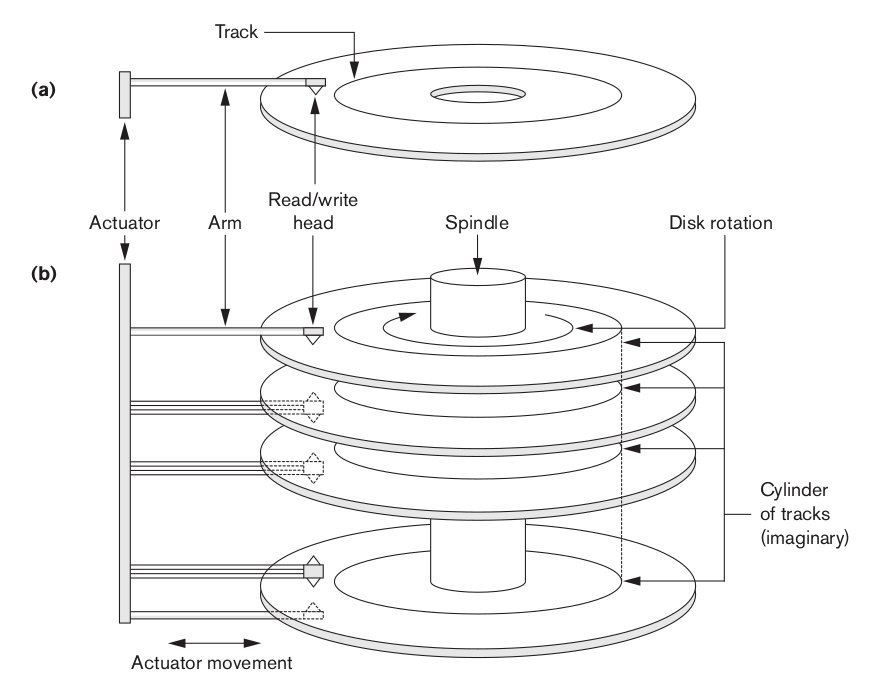
- Data capacity: track capacity = bits per track; a track holds many blocks. Tracks toward the outside are longer, so modern disks pack more sectors on outer tracks (zoned recording).
- A block address is essentially the tuple (cylinder #, surface/track #, block #). The hardware moves the arm to the cylinder, selects the surface, and waits for the block to rotate under the head.
- A disk controller (with its own cache/buffer) mediates between the CPU and the drive; the disk is a random-access device (any block can be addressed directly), unlike tape.
Blocks and Block Transfer
Data is transferred between disk and main memory in whole blocks (a.k.a. pages), never single bytes.
- Block size (B) is fixed at formatting time (commonly 512 B up to several KB). Each disk read/write moves exactly one block into a buffer in main memory.
- Larger blocks amortize the fixed per-access cost over more data but waste space on small records; block size is a design trade-off.
Disk Access Time
Reading a block requires mechanical motion, which is why disk access is orders of magnitude slower than memory access. Total time to fetch a block:
| Component | Definition |
|---|---|
| Seek time (s) | Time to move the read/write arm to the correct cylinder/track — usually the largest component |
| Rotational delay / latency (rd) | Time for the desired block to rotate under the head (on average, half a revolution) |
| Block transfer time (btt) | Time to actually read the block's bits as they pass under the head |
Why locality matters
Seek time dominates. Blocks stored in the same cylinder need no seek between them, and consecutive blocks avoid extra rotational delay. So placing records that are accessed together in contiguous blocks / the same cylinder dramatically cuts I/O cost — this is the whole motivation behind ordered files, clustering, and index design later in the chapter.
Example: fetching 100 scattered blocks may pay a seek + rotational delay 100 times; fetching 100 contiguous blocks pays seek + latency once and then streams the rest at the bulk transfer rate — often 10–100× faster for the same amount of data.
Solid-State Drives (SSD / Flash)
SSDs are increasingly the primary secondary-storage medium:
- No moving parts → no seek time or rotational delay, so random access is nearly as fast as sequential.
- Built from NAND flash (nonvolatile EEPROM) plus a controller and its own DRAM buffer.
- Trade-offs: writes are slower than reads, data is erased in large blocks, and cells wear out after many erase cycles — controllers use wear leveling to spread writes.
- Because random reads are cheap, SSDs weaken (but don't eliminate) the classic "minimize seeks" assumptions built into disk-based file and index design.
Buffering of Blocks
When many blocks must be transferred, the DBMS can overlap disk I/O with CPU processing so the CPU isn't idle waiting for the disk (and vice versa). Main memory is divided into buffers, each holding one disk block.
Double Buffering
With two (or more) buffers, the system reads the next block into one buffer while the CPU processes the block already sitting in the other buffer.
- While the CPU processes Buffer A, the disk controller fills Buffer B. When the CPU finishes A, it switches to B, and A is refilled — the roles alternate.
- If processing one block takes less time than reading the next, the disk can stream blocks continuously with no gaps, and the effective read rate approaches the disk's bulk transfer rate.
Why it works
The disk I/O and the CPU work run on independent hardware (the disk controller does the transfer via DMA while the CPU computes). Double buffering lets these two proceed in parallel instead of serially, hiding much of the disk latency.
Interleaved vs Parallel Processing
| Concept | Meaning |
|---|---|
| Interleaved concurrency | A single CPU switches between processes/tasks, giving the appearance of simultaneity |
| Parallel processing | Genuinely simultaneous work on separate units — e.g. the disk controller transferring one block while the CPU processes another |
Double buffering exploits real parallelism between the disk subsystem and the CPU. Reading/writing several contiguous blocks with buffering is far more efficient than issuing separate, independent single-block requests.
Buffer Management
Main memory can hold many buffers (a buffer pool), and the buffer manager decides which disk blocks stay resident.
The buffer manager's twofold goal
The buffer manager pursues two goals:
- Maximize the probability that the requested page is already in main memory — i.e. raise the buffer hit rate.
- When a new disk block must be read in, pick a page to replace (the victim) that causes the least harm — one unlikely to be needed again shortly.
Two kinds of buffer managers:
| Kind | How it works | Common in |
|---|---|---|
| Directly controls main memory | The buffer manager manages the main-memory area itself | Most RDBMSs |
| Allocates in virtual memory | Allocates buffers in virtual memory and hands control to the OS; the OS decides which buffers are actually resident in main memory and which are paged to disk | Main-memory DBMSs and some OODBMSs |
- When a needed block is already in a buffer, no disk I/O is required (a buffer hit) — this is a key performance win for frequently accessed blocks (e.g. index roots, catalog pages).
- When the pool is full and a new block must be loaded, a replacement strategy (LRU, clock, etc.) chooses a victim buffer to evict; a dirty (modified) victim must be written back to disk first.
- The buffer manager also tracks which buffers are pinned (in use and must not be evicted) and which are dirty (need flushing) — this ties directly into recovery and concurrency in later chapters.
Replacement (Cache) Strategies
When the pool is full, the strategy for picking the victim directly controls the hit rate. The goal is always the same: evict the page least likely to be needed soon.
| Strategy | Rule | Notes |
|---|---|---|
| LRU (Least Recently Used) | Evict the buffer unused for the longest time | Exploits temporal locality; the common default, but needs per-access bookkeeping |
| Clock (second-chance) | Buffers sit in a ring with a reference bit; the "hand" sweeps, clearing set bits and evicting the first buffer whose bit is already 0 | A cheap approximation of LRU — most real systems use this |
| FIFO (First-In-First-Out) | Evict the buffer loaded earliest, regardless of use | Simple but can evict a hot page still in heavy use |
| MRU (Most Recently Used) | Evict the most recently used buffer | Wins for cyclic/large sequential scans where the oldest pages are reused first |
DBMS can out-smart a generic cache
Unlike an OS, the DBMS often knows the access pattern in advance (e.g. a sequential table scan, or a nested-loop join that repeatedly rescans the inner relation). It can therefore choose a strategy per operation — for instance MRU for a repeated scan — instead of relying on a single global policy.
Buffer Manager vs. OS Virtual Memory
The buffer manager solves the same core problem an OS's virtual-memory system does — keep a small, fast memory populated with the most useful pages from a larger, slower store — so the vocabulary maps almost one-to-one:
| Buffer manager (DBMS) | Virtual memory (OS) | Shared idea |
|---|---|---|
| Buffer / frame in the buffer pool | Page frame in physical RAM | Fixed-size slot holding one page |
| Disk block / page | Page (in the process's virtual address space) | Fixed-size unit moved in and out |
| Buffer table / directory (block ID → frame, usually a hash table) | Page table (virtual page # → physical frame) | Lookup structure mapping a page identity to its resident frame |
| Buffer hit / miss | Page in RAM / page fault | Requested page present vs. must be fetched |
| Replacement strategy (LRU, Clock…) | Page-replacement algorithm (LRU, Clock…) | Same algorithms choose the victim |
| Dirty bit → write victim back to disk | Dirty bit → page-out to the swap area | Only modified pages must be written before eviction |
| Pinned buffer (must not be evicted) | Locked / wired page (e.g. mlock) | Page held resident while in use |
| Flush dirty buffers | Swap out / page out | Persist modified pages to the backing store |
Why a DBMS doesn't just rely on the OS
The two-goal buffer manager frequently beats plain OS paging because it (1) knows which pages are hot (index roots, the catalog) and its own access patterns, and (2) must control when a dirty page reaches disk for recovery — it cannot let the OS flush a page whenever it likes. That's exactly why most RDBMSs use the direct-control kind of buffer manager rather than leaning on virtual memory.