
Introduction
Heap, sorted, and hashed files cover the three classic ways of laying records out inside one file. This note closes the loop on file organization with two remaining topics:
- other primary file organizations — mixed files, clustered files, trees, and column stores;
- RAID, which attacks the problem from underneath by making several disks behave as one faster, more reliable disk.
The connection between them is the same bottleneck as always: disk access is slow, so either arrange the records more cleverly, or make the disk itself go faster.
Other Primary File Organizations
Files of Ordered Records Using Trees
A file can use a tree structure as its primary organization, with records held in the tree's nodes and the tree kept balanced as records are inserted and deleted. The dominant form is the B⁺-tree, which supports both equality search and range search in a few block accesses while allowing cheap insertion — the combination neither sorted files nor hash files can offer alone.
B-trees and B⁺-trees are covered in full in the indexing chapter, where they appear both as a primary organization (the data lives in the tree) and as an index over data stored elsewhere.
Mixed (Clustered) Files
Every organization so far assumes a file holds records of one type, and that a query touching two relations must read two files and join them.
Definition
A mixed (or clustered) file stores records of two or more different types interleaved in the same blocks, physically grouped so that records commonly retrieved together sit together.
The canonical case is a one-to-many relationship. Instead of storing all DEPARTMENT records in one file and all EMPLOYEE records in another, a mixed file stores each department record followed immediately by the employee records of that department. A query for "the department and all of its employees" is then answered by reading a handful of adjacent blocks rather than scanning or joining two files.
Because the blocks now contain heterogeneous records, each record must carry a record type field so the DBMS can interpret its layout, and the file needs pointers or an index to locate a cluster.
| Gained | Lost | |
|---|---|---|
| Mixed file | Related records retrieved in one or two block accesses; no join I/O | Scanning one record type alone becomes expensive; blocks are harder to manage; the clustering favours exactly one query pattern |
The lesson generalizes: clustering is a bet on a specific access pattern. It pays extremely well when the bet is right and costs when the workload changes.
Column-Based Storage
Everything above stores records row-wise (row store): all fields of a record are contiguous, so fetching a whole record is one read. Column-based storage (column store) inverts this — the values of a single column are stored contiguously, one file (or segment) per attribute.
For an analytical query such as SELECT AVG(salary) FROM EMPLOYEE, a row store must read every block of the file to get at one field; a column store reads only the salary column.
Why column stores win on analytics
- Less I/O — only the columns a query mentions are read.
- Far better compression — a column holds values of one type from one domain, so run-length, dictionary, and delta encoding all work well; less data on disk means fewer block accesses.
- Vectorized processing — operating on a contiguous run of same-typed values is cache- and CPU-friendly.
And where they lose
Reconstructing a full row means gathering one value from each column file, and inserting or updating a single row touches every column. Column stores are therefore the norm for OLAP / data warehousing (few writes, wide scans, aggregation) and a poor fit for OLTP (many small point reads and writes of whole rows).
Parallelizing Disk Access Using RAID
Processor speed and memory capacity have grown far faster than disk access time. The way out is not a faster disk but more disks used in parallel.
Definition
RAID — Redundant Arrays of Independent Disks — is an organization in which multiple physical disks are presented to the system as a single logical disk, using data striping for performance and redundancy for reliability.
Data Striping
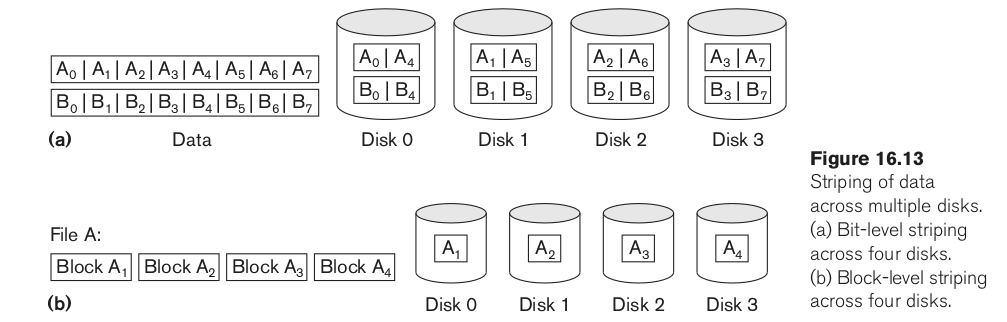
Data striping distributes data transparently over several disks so that they can be read and written in parallel, multiplying the effective transfer rate.
| Granularity | Unit distributed | Effect |
|---|---|---|
| Bit-level striping | the bits of each byte, spread over 8 disks | Every access uses all disks at once — 8× the transfer rate for a single request, but only one request can be served at a time |
| Block-level striping | whole blocks, round-robin across | Block |
Block-level striping is what real arrays use, because it improves both kinds of workload.
Striping alone makes reliability worse
With
An array of 100 disks each rated at 100 000 hours fails, on average, every 1000 hours — about 6 weeks. This is exactly why the R in RAID stands for redundant.
Redundancy
Two mechanisms restore (and exceed) single-disk reliability:
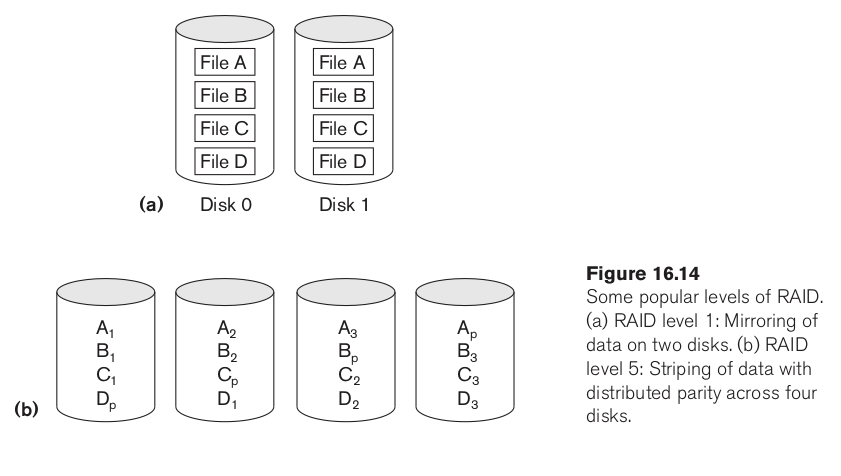
- Mirroring / shadowing — every block is written to two disks. Reads can be served by either copy, so read throughput doubles; writes must go to both, so a write is as slow as the slower disk. Storage cost: 100% overhead.
- Parity — for each set of corresponding blocks across
data disks, store their bitwise XOR on an extra disk:
If any one disk is lost, its contents are recomputed by XOR-ing the survivors with the parity. Storage cost: one extra disk out of
The small-write problem
Updating a single block on a parity array requires reading the old data and the old parity, computing the new parity, and writing both data and parity — four accesses for one logical write. This write penalty is the main reason parity-based RAID is weaker on write-heavy OLTP workloads than mirroring.
RAID Levels
| Level | Technique | Redundancy | Notes |
|---|---|---|---|
| RAID 0 | Block striping only | None | Best performance and capacity; one disk failure loses everything. Suitable only for scratch/temporary data |
| RAID 1 | Mirroring | Full copy | Fastest recovery, excellent read performance, expensive. Common for transaction logs |
| RAID 0+1 / 1+0 | Striping and mirroring | Full copy | Combines RAID 0 speed with RAID 1 safety; the usual choice when money is available |
| RAID 2 | Bit striping + Hamming code | ECC | Obsolete — disks already detect their own errors |
| RAID 3 | Bit/byte striping + one parity disk | Parity | Every access uses all disks; one request at a time |
| RAID 4 | Block striping + one dedicated parity disk | Parity | The parity disk becomes a bottleneck: every write touches it |
| RAID 5 | Block striping + parity distributed over all disks | Parity | Removes RAID 4's bottleneck; the standard general-purpose level |
| RAID 6 | Block striping + two independent parity blocks (P+Q) | Double parity | Survives two simultaneous disk failures; more write overhead. Increasingly the default as disk capacities — and thus rebuild times — grow |
Choosing a Level
RAID 0 and RAID 5 are the endpoints of the usual trade-off, and RAID 1 sits alongside them for write-critical data:
| Requirement | Level |
|---|---|
| Raw speed, data is reproducible | RAID 0 |
| Write-heavy, latency-critical (logs, journals) | RAID 1 or 1+0 |
| General-purpose database storage | RAID 5 |
| Large arrays where a rebuild takes many hours | RAID 6 |
RAID in a DBMS
A DBMS does not treat the array as one undifferentiated pool. A common arrangement puts the log file on a mirrored pair — it is written sequentially and constantly, and losing it loses committed transactions — while data files sit on RAID 5, where the read-mostly workload hides the write penalty. Some systems go further and place heavily-joined tables on separate arrays so their I/O proceeds in parallel.
RAID is not a backup
RAID protects against disk failure, not against deletion, corruption, or a bad UPDATE — those are faithfully replicated to every disk in the array. Recovery from logical damage remains the job of backups and the transaction log.